
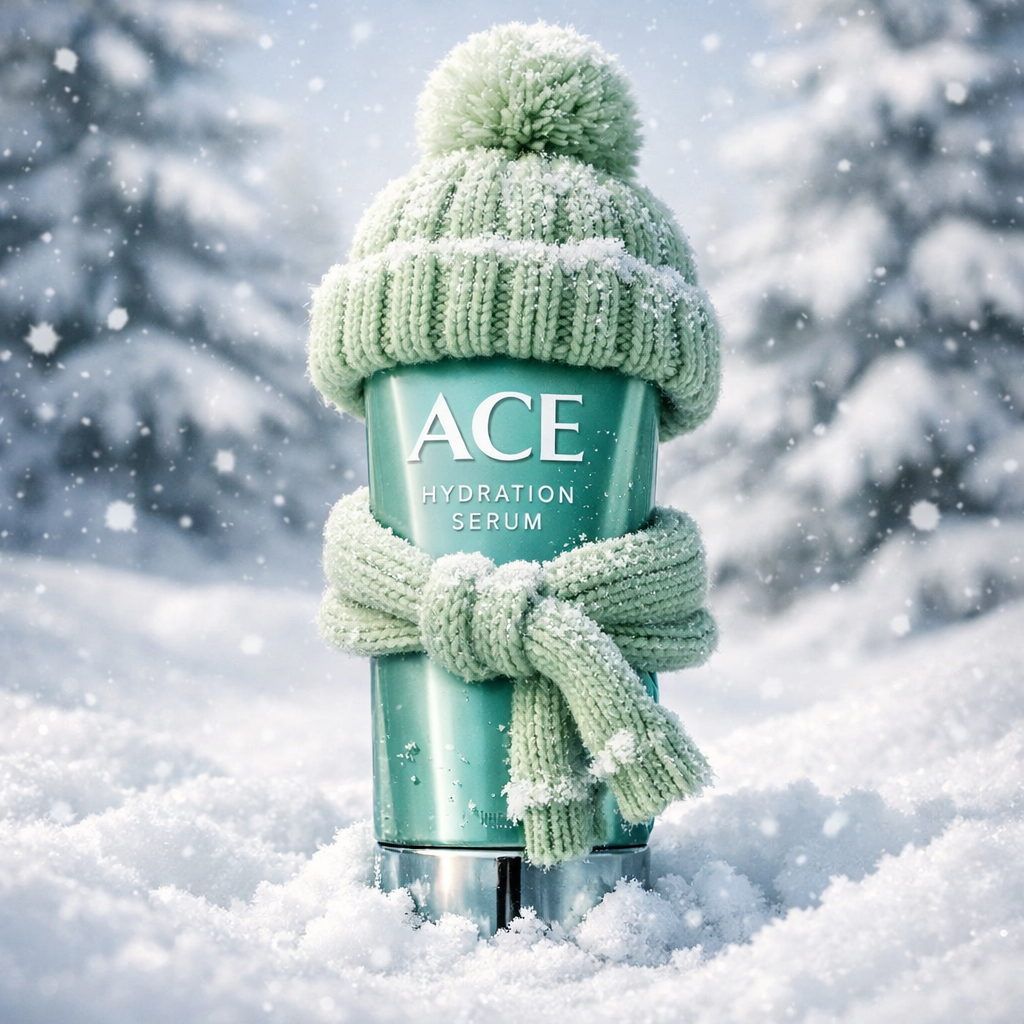
Prompt #27: Hydration serum dressed for winter
Now you can create high-quality AI product photography like Hydration serum dressed for winter and product designs using powerful AI tools like Nano Banana Pro and ChatGPT Image 1.5. Before AI, designing realistic product visuals was difficult, time-consuming, and required professional skills.
With AI, anyone can easily create stunning product designs in just a few minutes. These tools allow you to generate studio-quality product shots, creative concepts, and marketing visuals without expensive equipment or complex software.
In this article, I’ll show you all types of product designs you can create using Nano Banana Pro, one of the most powerful AI models for product design. You can also achieve great results with tools like Midjourney v6 and Leonardo AI, but for now, I’ll focus on Nano Banana Pro to demonstrate what’s possible with AI-powered product design.
As an eCommerce business owner, you often waste a lot of time creating eye-catching product images and click-worthy product videos. Many store owners struggle to find the right product photography backgrounds or suitable reference images for their products.
With the help of AI, this process becomes much easier. By using reference images and tools like Nano Banana Pro and ChatGPT Image 1.5, you can create high-quality AI product photography for free—saving time, effort, and cost while achieving professional results.
I personally tested these prompts, and by using this exact prompt, you can create high-quality, clickbait-style product design photography that stands out and grabs attention instantly.
ace Create a hyper-realistic commercial photo of attached product standing upright in deep snow during winter. The product has a knitted winter beanie on top in light green with a fuzzy pom-pom. The tube is wrapped with a samll matching pastel knitted winter scarf tied around it. Snowflakes and frost are scattered on the hat, scarf, and surface of the tube, with small snow chunks stuck near the bottom.
The background shows softly blurred snow-covered pine trees and a bright cold winter atmosphere. Light snow is falling gently. Use cinematic luxury product lighting, shallow depth of field, 8K clarity, sharp glass-like reflections, and detailed knitted fabric textures. Maintain a cozy winter-themed skincare advertisement aesthetic.
How to Convert an Image into a Video (Free Method)
In this article, I will show you how to convert any product image into a video using Grok Imagine, which is completely free for users. With this tool, you can easily transform a static image into an AI-generated video in just a few steps.
Step 1: Visit Grok Imagine
Go to the official Grok Imagine website and sign in using your Gmail account.
Step 2: Upload Your Product Image
Upload your product design image. The AI model will automatically analyze the image and prepare it for video generation.
Step 3: Add Your Prompt
You can also add a custom prompt describing how you want the video to look. Paste the prompt you prefer to guide the AI in generating the video.
 Create a hyper-realistic cinematic winter product video using the provided image as the exact visual reference.

The skincare tube stands upright in deep snow, wearing a light pastel green knitted winter beanie with a fuzzy pom-pom and a small matching knitted scarf tied around the tube. Snowflakes and frost are visible on the hat, scarf, and product surface, with small snow chunks near the base.

Camera motion:
– Slow cinematic push-in (subtle zoom forward)
– Very slight left-to-right parallax movement

Environment animation:
– Gentle snowfall drifting naturally across the frame
– Soft winter breeze lightly moving the scarf ends and pom-pom
– Cold misty air particles in the background

Lighting:
– Luxury commercial skincare lighting
– Soft diffused key light from front
– Cool rim light outlining the product edges
– Glass-like reflections on the tube

Background:
– Softly blurred snow-covered pine trees
– Bright cold winter daylight atmosphere
– Shallow depth of field (bokeh snowfall in background)

Mood & style:
– Cozy winter skincare advertisement
– Premium, clean, minimal, high-end cosmetic brand look
– Hyper-realistic, photorealistic textures

Quality:
– 8K clarity
– Ultra-detailed knitted fabric texture
– No text, no logos added, no scene change
– Maintain exact product shape, color, and proportions

Duration 5–7 seconds, smooth motion, ad-ready output.
Step 4: Generate and Download the Video
Click on generate, and within about 1 minute, your video will be ready. Finally, download the video to your device.
Final Words
By following this simple process, you can generate high-quality videos from images completely for free—no advanced skills required.