

Lightricks Open-Sources LTX-2 for Text-to-Video and Audio Generation | You can create 20-second 4K videos at 50 FPS.
Today, Lightricks launched a new AI model called LTX-2, which is a powerful video generation AI. This model can convert any text into a video with perfectly matching sound. You can generate videos of up to 20 seconds in 4K resolution at 50 FPS, which truly makes it a strong competitor to Gemini VEO 3 and Grok Imagine.
One of the most important things you should know is that LTX-2 supports camera controls and custom styles. The model works in two parts:
- one for video generation
- another for audio generation
Both parts work together seamlessly, so speech, sound effects, and background audio feel natural and do not sound like typical AI-generated voices.
If you want to run LTX-2 on your local machine, Lightricks provides the full code. You can use the Plus or higher version and run it on machines equipped with RTX GPUs.
What video editors can do with LTX-2:
- 🎬 Generate full scenes from scripts (visuals + dialogue + sound effects)
- 🎙️ Create natural lip-sync for talking characters
- 🔊 Auto-generate background sounds (ambience, environment, reactions)
- 🎥 Control camera movement (zoom, pan, angle, cinematic shots)
- 🎭 Change visual styles using custom LoRAs (cinematic, anime, fantasy, realistic)
- 🧍 Animate characters with emotions, expressions, and body movement
- 🔁 Quickly iterate scenes by editing text instead of timelines
- 🖥️ Run locally on RTX GPUs for privacy and faster workflows
How to Use Lightricks LTX-2
Step 1:
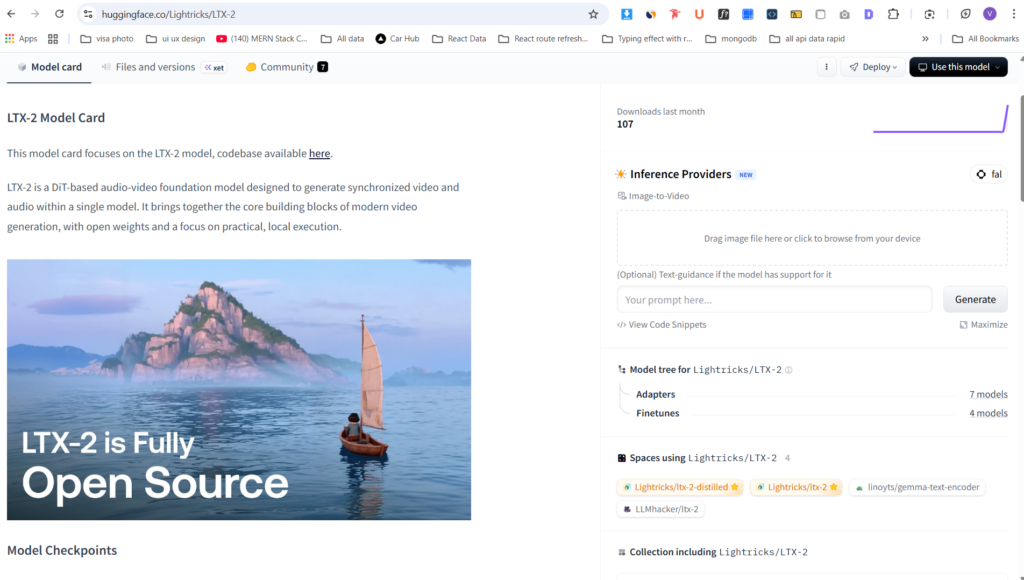
Visit the official Lightricks LTX-2 page on Hugging Face:
https://huggingface.co/Lightricks/LTX-2
Step 2:
Sign in using your Gmail account (or any supported login method).
Step 3:
After signing in, open the demo interface provided on the page.
Step 4:
Upload an image (optional, if supported) and enter your text prompt describing the video you want to generate.
Step 5:
Click on the Generate button.
The model will then process your input and generate a video automatically based on your prompt.